
PLATFORM · STAFF ADMINISTRATION PORTAL
Run your daily SMS operations in one portal.
Connect customers and suppliers, assign routes, set destination rates and manage prepaid credit. Follow each message from submission to the delivery status reported by your supplier.
Built for application-to-person (A2P) SMS providers. Pre-launch inquiries are open; commercial service is not yet available.
- 01CustomersInbound SMPP binds and HTTP API access
- 02SuppliersOutbound SMPP binds on your accounts
- 03RoutesConfigured customer-to-supplier assignments
- 04Rates & creditBalance and credit limit checked before forwarding
- 05Traffic logSwitch acceptance and supplier receipts
A staff portal for you. SMPP and HTTP for your customers.
Your operations team manages customers, suppliers, routing, rates, prepaid credit, and traffic records inside the TextEnvoy administration portal. Your messaging customers connect their software directly to your dedicated switch over SMPP or the HTTP sending API—TextEnvoy does not include a web self-service campaign portal for end SMS customers.
WORKFLOW 01 / CUSTOMER CONNECTIONS
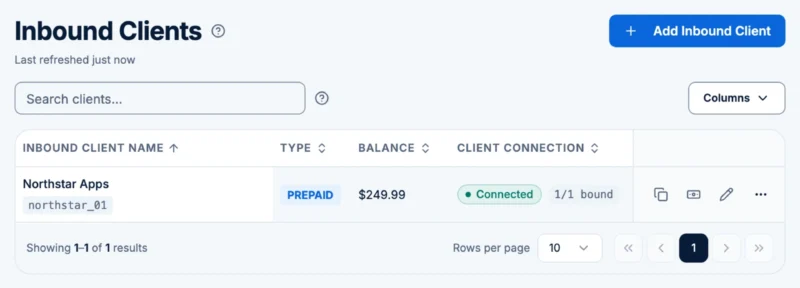
Connect customer applications over SMPP or HTTP
Daily task: Create customer messaging accounts and issue inbound SMPP bind credentials or HTTP sending API access on your dedicated switch instance.
For your team: Manage SMPP and HTTP customer connections from the same staff portal.
Limit: Customer access is programmatic (SMPP / HTTP API). There is no end-customer web portal or campaign builder.
PRODUCT SCREENSHOT Staff portal · Synthetic test data
PRODUCT SCREENSHOT Staff portal · Synthetic test data
WORKFLOW 02 / SUPPLIER CONNECTIONS
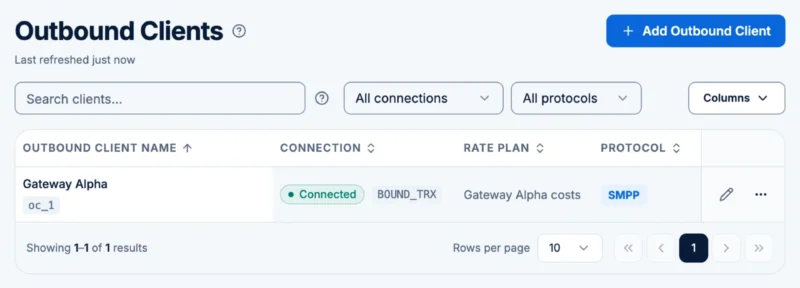
Connect your SMPP suppliers
Daily task: Configure outbound SMPP connections to the upstream aggregators, messaging hubs, or carrier accounts your business contracts with directly.
For your team: Keep supplier connection settings and bind status together, so staff can check which connections are ready to carry traffic.
Limit: TextEnvoy supplies switching software, not SMS termination. A supplier bind does not imply direct mobile network operator (MNO) connectivity.
WORKFLOW 03 / ROUTE CONTROL
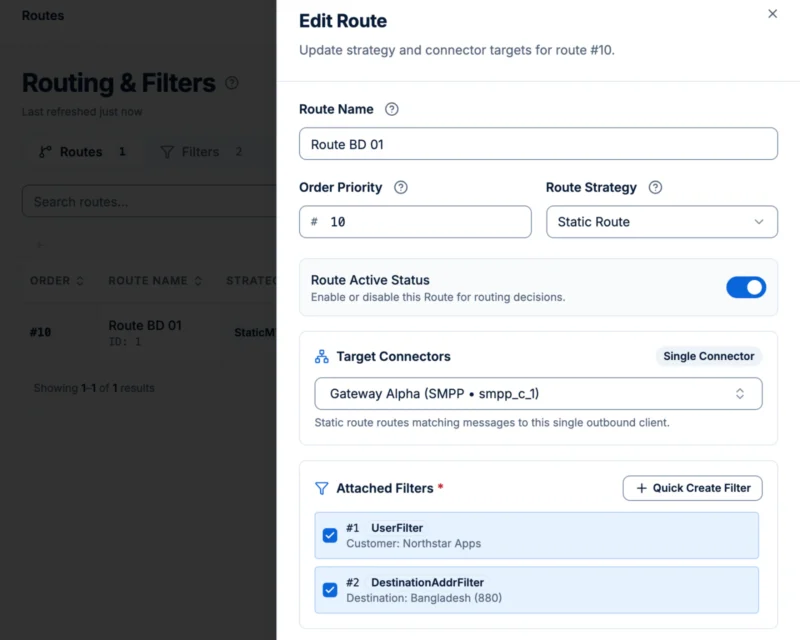
Choose the supplier route for customer traffic
Daily task: Assign inbound customer traffic to your connected outbound SMPP supplier binds using TextEnvoy’s supported routing rules in the staff portal.
For your team: See which supplier connection is assigned to customer traffic and review the configuration before making changes.
Limit: Routes follow your configuration: one supplier, failover or round-robin. No dynamic least-cost routing or MNP/HLR lookups.
PRODUCT SCREENSHOT Staff portal · Synthetic test data
PRODUCT SCREENSHOT Staff portal · Synthetic test data
WORKFLOW 04 / RATES & CREDIT
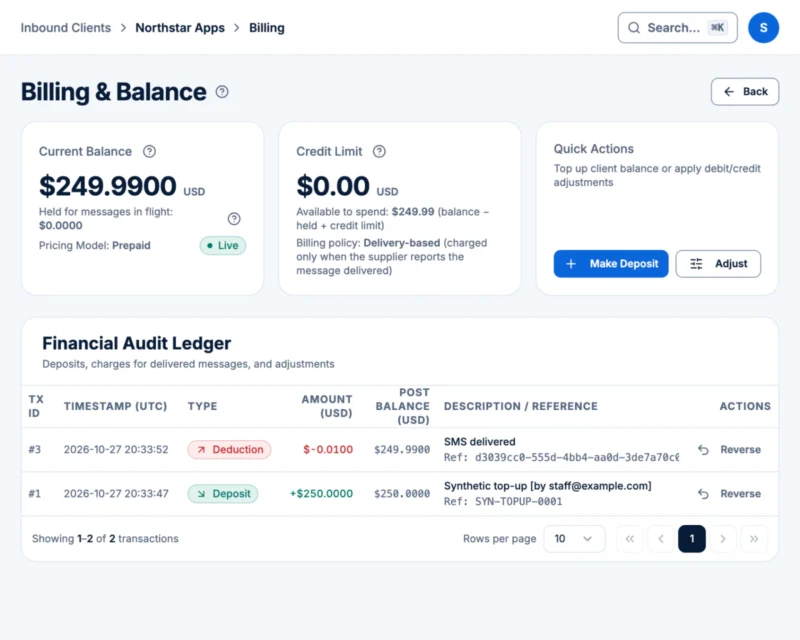
Set destination rates and manage customer credit
Daily task: Maintain customer rate sheets and update prepaid balances and credit limits that TextEnvoy checks before accepting customer traffic for outbound forwarding.
For your team: Check customer rates and available credit before forwarding traffic, and choose whether each customer is charged on submission, attempt or delivery.
Limit: Records support operations, not invoicing or accounting.
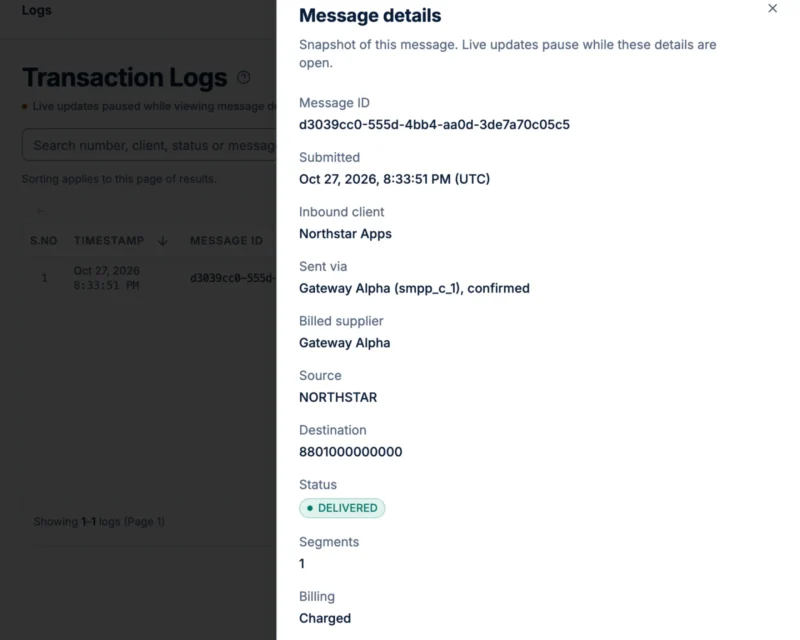
WORKFLOW 05 / TRAFFIC & DLR LOGS
Trace message status and billing records
Daily task: Search message logs to review customer submission timestamps, switch acceptance status, supplier-returned delivery receipts (DLRs), and per-message billing records.
For your team: Investigate delivery questions with the submission, supplier receipt and related billing records at hand.
Limit: Delivery status is what your supplier reports. Billing records are operational, not customer invoices.
PRODUCT SCREENSHOT Staff portal · Synthetic test data
Evaluate technical fit before we speak
| Capability Area | Supported Scope in TextEnvoy SMS Switch | Current Scope Boundaries & Exclusions |
|---|---|---|
| Downstream Customer Ingress | Inbound SMPP binds and HTTP sending API on your dedicated switch instance | No end-customer self-service web portal; no scheduled SMPP delivery |
| Upstream Supplier Egress | Outbound SMPP client binds using your own supplier accounts | TextEnvoy provides no SMS routes, carrier agreements, or message credits; a supplier bind does not imply direct MNO connectivity |
| Administration & Access | Web administration portal for your internal operations staff | No multi-tier sub-reseller portals or granular custom RBAC role matrices |
| Routing Control | Single-supplier, failover and round-robin routes configured in the staff portal | No dynamic LCR or MNP/HLR lookups |
| Commercial & Balance Control | Destination rate management, prepaid balances and customer credit limits, a billing policy per customer, and operational billing records | No tax calculation, automated invoicing, or payment processing |
| Traffic & Status Visibility | Message traffic inspection, switch acceptance status, and supplier-returned DLR tracking | DLR accuracy depends on upstream supplier reporting; no cross-server HA guarantees |
Confirm whether TextEnvoy matches your switching workflow
Share your customer protocol mix, supplier setup, and operational requirements for a candid pre-launch fit review.